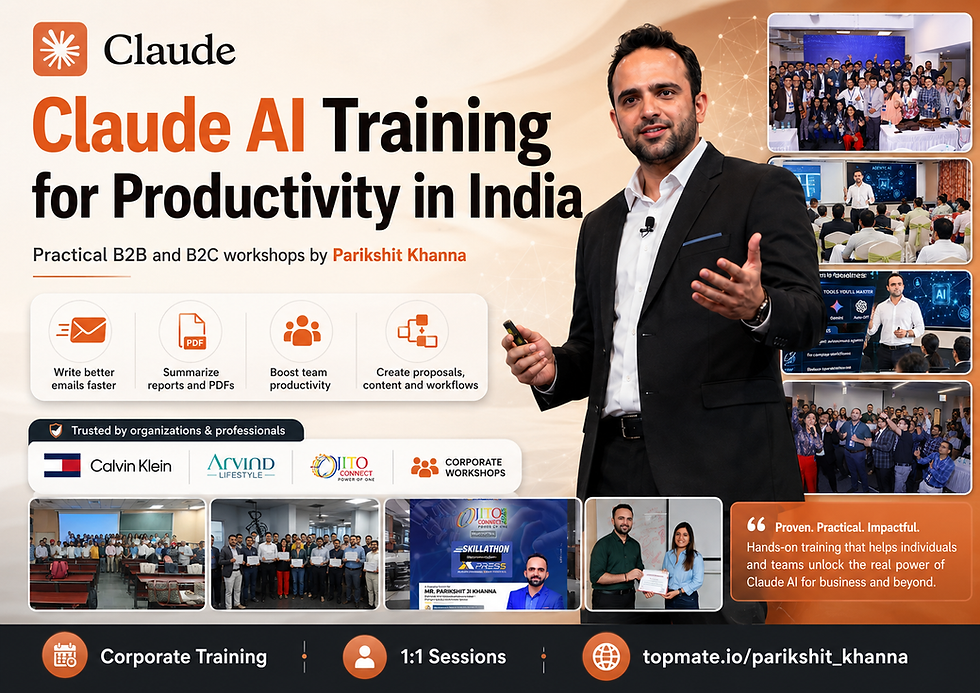
Claude AI Training for Productivity in India: B2B and B2C Training by Parikshit Khanna

Introduction
Claude AI is becoming one of the most powerful productivity tools for Indian professionals, founders, students, HR teams, sales teams, marketers, educators, consultants, doctors, finance teams, and corporate leaders.
In India, the biggest challenge is not access to AI tools. The real challenge is knowing how to use AI properly for daily work.
That is where Claude AI Productivity Training by Parikshit Khanna helps.
This training is designed for people and organizations who want to use Claude AI for practical outcomes such as faster emails, better reports, improved presentations, research summaries, HR documentation, proposal writing, content creation, business planning, Excel analysis, SOP drafting, and decision support.
Blog Overview
Section | Details |
Blog Topic | Claude AI Training for Productivity in India |
Trainer | Parikshit Khanna |
Brand | Digital Training Jet |
Training Type | B2B and B2C |
Best For | Professionals, founders, students, corporate teams, HR, sales, marketing, finance, legal, healthcare, education |
Training Mode | Online, offline, hybrid |
Main Tool | Claude AI |
Supporting Tools | ChatGPT, Gemini, Perplexity, Microsoft Copilot, Canva AI, Gamma, Excel AI |
Booking CTA | Book via Topmate: https://topmate.io/parikshit_khanna |
Why Claude AI Training Matters in India
Productivity Problem in India | How Claude AI Helps |
Too much time spent writing emails | Claude can draft, rewrite, simplify, and professionalize emails |
Long reports and documents | Claude can summarize and extract key points |
Poor presentation structure | Claude can create outlines, slide flow, speaker notes, and summaries |
Repetitive HR and admin work | Claude can create JDs, policies, FAQs, checklists, and training calendars |
Slow sales communication | Claude can draft proposals, follow-ups, LinkedIn messages, and objection responses |
Content creation pressure | Claude can generate blogs, social posts, scripts, captions, newsletters, and campaigns |
Research overload | Claude can summarize, compare, classify, and structure research |
Lack of prompt clarity | Training helps users write better prompts and build repeatable workflows |
What Is Claude AI?
Point | Explanation |
Claude AI | An AI assistant created by Anthropic |
Main Strength | Writing, reasoning, summarizing, analysis, coding, document understanding, and productivity workflows |
Best For | Professionals who want thoughtful, structured, and high-quality outputs |
Common Uses | Emails, reports, summaries, research, presentations, business strategy, content writing, coding support |
Why Train on Claude | Most users underuse Claude because they do not know how to prompt it correctly |
Who Should Attend This Claude AI Productivity Training?
Audience | Use Case |
Business Owners | Planning, customer communication, marketing, proposals |
Corporate Teams | Daily productivity, documentation, analysis, reporting |
HR Teams | JD writing, onboarding, policy FAQs, interview questions |
Sales Teams | Lead research, outreach, follow-ups, pitch scripts |
Marketing Teams | Campaigns, blogs, social media, ad copy, customer personas |
Finance Teams | MIS notes, summaries, variance explanations, report narratives |
Legal Professionals | Drafting support, case chronology, document summarization, research structuring |
Healthcare Professionals | Patient communication drafts, CME content, medical education summaries |
Teachers and Faculty | Lesson plans, rubrics, feedback, research assistance |
Students | Resume, assignments, presentations, internships, interview preparation |
Freelancers | Client proposals, content, research, service packaging |
Consultants | Strategy notes, frameworks, reports, decks, client communication |
Core Benefits of Claude AI Productivity Training
Benefit | Practical Outcome |
Faster work | Save time on writing, documentation, and research |
Better communication | Improve email tone, clarity, and professionalism |
Stronger reports | Convert rough notes into structured business reports |
Better decision support | Organize pros, cons, risks, and recommendations |
Repeatable workflows | Move beyond random prompts and create systems |
Department-wise productivity | Apply Claude to HR, sales, marketing, finance, legal, education, and healthcare |
Responsible AI use | Learn privacy, verification, accuracy, and safe usage habits |
Claude AI Training Modules
Module | Topics Covered | Output Participants Create |
Module 1: Claude AI Basics | What Claude is, how it works, strengths, limits | First productivity prompt set |
Module 2: Prompt Engineering | Role prompts, context prompts, output format prompts | 20 ready-to-use prompts |
Module 3: Email Productivity | Formal emails, follow-ups, client replies, escalation emails | Email templates |
Module 4: Document Summarization | Long PDFs, notes, policies, meeting documents | Summary and action-point format |
Module 5: Business Writing | Reports, proposals, pitch notes, internal updates | Business writing templates |
Module 6: Research and Analysis | Market research, competitor research, comparison tables | Research framework |
Module 7: HR Productivity | JDs, interview questions, onboarding plans, employee FAQs | HR toolkit |
Module 8: Sales and Marketing | Lead research, campaigns, posts, scripts, proposals | Sales and marketing prompt bank |
Module 9: Excel and MIS Support | KPI explanation, variance notes, dashboard narrative | MIS summary format |
Module 10: Responsible AI | Privacy, hallucination checks, human review, data safety | AI safety checklist |
B2B Claude AI Training Packages in India
Package | Duration | Best For | Format | Suggested Pricing |
Claude AI Awareness Session | 60 to 90 minutes | CXO, leadership, HR, department heads | Online/offline keynote | ₹25,000 to ₹50,000 |
Claude AI Productivity Workshop | 2 hours | Corporate teams, startup teams, business teams | Live demo + Q&A | ₹35,000 to ₹75,000 |
Half-Day Claude AI Bootcamp | 3 to 4 hours | HR, sales, marketing, finance, admin teams | Hands-on practical workshop | ₹75,000 to ₹1,25,000 |
Full-Day Claude AI Productivity Lab | 6 to 8 hours | Corporate teams needing practical adoption | Hands-on department-wise training | ₹1,25,000 to ₹2,50,000 |
2-Day Claude AI Implementation Program | 12 to 16 hours | Companies that want workflows and templates | Workshop + workflow building | ₹2,50,000 to ₹5,00,000 |
Monthly AI Productivity Retainer | Monthly | Companies needing ongoing enablement | Training + templates + review support | Custom pricing |
B2B Department-Wise Session Ideas
Department | Claude AI Training Use Cases |
HR | JD writing, interview questions, onboarding plans, employee communication, policy FAQs |
Sales | Lead research, proposals, cold emails, follow-ups, objection handling, CRM notes |
Marketing | Campaign ideas, blog posts, social content, ad copy, buyer personas, content calendars |
Finance | MIS summaries, variance explanation, monthly review notes, Excel narrative summaries |
Legal | Drafting support, chronology creation, document summarization, contract clause explanation |
Operations | SOP drafting, checklists, vendor communication, workflow documentation |
Admin | Email replies, reports, meeting notes, task summaries, internal updates |
Leadership | Decision memos, strategy summaries, risk mapping, presentation outlines |
Education | Lesson plans, rubrics, student feedback, research summaries, assignment design |
Healthcare | Patient-friendly explanation drafts, CME content, clinic communication, research tracking |
B2C Claude AI Training Packages in India
Package | Duration | Best For | Suggested Pricing |
Claude AI Starter Session | 90 minutes | Students and beginners | ₹999 to ₹1,999 |
Claude AI for Professionals | 2 hours | Working professionals | ₹1,999 to ₹4,999 |
Claude AI for Career Growth | 3 hours | Job seekers, students, early professionals | ₹2,999 to ₹6,999 |
Claude AI for Freelancers and Consultants | 3 to 4 hours | Freelancers, trainers, consultants | ₹4,999 to ₹9,999 |
Claude AI for Business Owners | 4 hours | Founders, coaches, local business owners | ₹7,999 to ₹19,999 |
4-Week Claude AI Productivity Bootcamp | 8 to 12 hours | Serious learners | ₹14,999 to ₹49,999 |
1:1 Claude AI Mentorship | Per session | Personalized learning | ₹4,999 to ₹15,000 |
Claude Subscription Cost Reference
Claude Plan | Suitable For | Indicative Pricing |
Free | Occasional users and beginners | $0 |
Pro | Regular individual users | $20/month or $200/year |
Max 5x | Frequent users | $100/month |
Max 20x | Heavy daily users | $200/month |
Team Standard | Teams of 5 to 150 members | $20/seat/month annually or $25 monthly |
Team Premium | Power users in teams | $100/seat/month annually or $125 monthly |
Enterprise | Large businesses | Contact sales/custom |
Note: Claude pricing can change by region, tax, platform, and billing cycle. Indian users should check the latest pricing inside their Claude account before purchase.
Suggested B2B Training Agenda: 2-Hour Claude AI Productivity Session
Time | Topic | Activity |
0 to 10 minutes | Introduction to Claude AI | Why Claude matters for productivity |
10 to 25 minutes | Claude vs ChatGPT vs Gemini | When to use which tool |
25 to 45 minutes | Prompt Engineering Basics | Role, task, context, format, tone |
45 to 65 minutes | Email and Business Writing | Live demo with corporate examples |
65 to 85 minutes | Document and Report Productivity | Summaries, action points, meeting notes |
85 to 105 minutes | Department-Wise Use Cases | HR, sales, marketing, finance, legal |
105 to 115 minutes | Responsible AI Usage | Privacy, verification, sensitive data |
115 to 120 minutes | Q&A and Next Steps | Participant questions and action plan |
Suggested B2C Training Agenda: 2-Hour Claude AI Productivity Session
Time | Topic | Activity |
0 to 10 minutes | What is Claude AI? | Beginner-friendly introduction |
10 to 25 minutes | Setting up Claude for productivity | Account, use cases, basic navigation |
25 to 45 minutes | Prompt writing made simple | 10 prompt structures |
45 to 65 minutes | Career and study use cases | Resume, LinkedIn, assignments, interview prep |
65 to 85 minutes | Freelancing and business use cases | Proposals, content, client communication |
85 to 105 minutes | Personal productivity | Planning, learning, summaries, decision support |
105 to 115 minutes | Mistakes to avoid | Privacy, copy-paste errors, overdependence |
115 to 120 minutes | Q&A | Personal use-case discussion |
Why Learn Claude AI from Parikshit Khanna?
Reason | Explanation |
Practical training style | Focus on live demos, not just theory |
Corporate-ready delivery | Suitable for HR, L&D, CXO, and business teams |
Multi-sector experience | AI training across corporate, education, healthcare, legal, sales, marketing, and finance |
Productivity-first approach | Training is focused on real work outcomes |
Indian context | Examples are designed for Indian professionals, companies, students, and founders |
Prompt banks included | Participants receive reusable prompt frameworks |
Responsible AI focus | Privacy, accuracy, human review, and ethical use are included |
Book Claude AI Training with Parikshit Khanna
Booking Type | Link |
1:1 Session, B2C Training, Consulting, Corporate Inquiry | |
Trainer | Parikshit Khanna |
Brand | Digital Training Jet |
Sample Claude AI Productivity Prompts
Use Case | Prompt |
Email Writing | Act as a senior corporate communication expert. Rewrite this email in a polite, professional, and action-oriented tone. Keep it concise and clear. |
Meeting Notes | Convert these rough meeting notes into a structured summary with decisions, action items, owners, deadlines, and pending questions. |
HR JD Creation | Create a professional job description for the role of [role name] for an Indian company. Include responsibilities, skills, experience, and interview questions. |
Sales Follow-Up | Draft a polite sales follow-up message for a client who attended a demo but has not replied for 7 days. |
Marketing Calendar | Create a 30-day LinkedIn content calendar for a B2B company in India targeting decision-makers. |
Report Summary | Summarize this report into executive summary, key findings, risks, opportunities, and next steps. |
Proposal Draft | Create a business proposal for [service] for [client type]. Include scope, benefits, timeline, pricing, and next steps. |
Legal Summary | Summarize this legal document in simple language and create a clause-wise table. Add a verification checklist. |
Finance Note | Convert this Excel summary into a management review note with key insights and recommended action points. |
Learning Plan | Create a 30-day learning plan for a beginner who wants to use Claude AI for office productivity. |
40 FAQs on Claude AI Training for Productivity in India
No. | FAQ | Answer |
1 | What is Claude AI? | Claude AI is an AI assistant by Anthropic that helps with writing, reasoning, summarizing, coding, research, and productivity tasks. |
2 | Why should Indian professionals learn Claude AI? | Because it can save time in emails, reports, research, presentations, documentation, planning, and content creation. |
3 | Is Claude better than ChatGPT? | Claude is especially strong for structured writing, long-form reasoning, document analysis, and thoughtful responses. ChatGPT, Gemini, and Claude all have different strengths. |
4 | Is Claude AI useful for corporate teams? | Yes. It is useful for HR, sales, marketing, finance, legal, operations, admin, leadership, education, and consulting teams. |
5 | Can Claude write emails? | Yes. Claude can draft, rewrite, shorten, polish, and personalize professional emails. |
6 | Can Claude summarize PDFs and long documents? | Yes, depending on the plan and upload limits. It is useful for summaries, action points, and structured insights. |
7 | Is Claude AI useful for students? | Yes. Students can use it for resume writing, interview preparation, assignments, research, presentations, and learning plans. |
8 | Is Claude AI useful for business owners? | Yes. Business owners can use it for sales messages, proposals, social media, customer communication, market research, and planning. |
9 | Can Claude help HR teams? | Yes. HR teams can create job descriptions, interview questions, onboarding plans, employee FAQs, training calendars, and policy drafts. |
10 | Can Claude help sales teams? | Yes. Sales teams can use it for lead research, pitch scripts, follow-up messages, proposals, objection handling, and customer summaries. |
11 | Can Claude help marketing teams? | Yes. Marketing teams can use it for blogs, social posts, campaigns, captions, ad copy, buyer personas, and content calendars. |
12 | Can Claude help finance teams? | Yes. It can help with MIS narratives, variance explanations, management summaries, and report interpretation. |
13 | Can Claude help legal professionals? | Yes, but with caution. It can help summarize, structure, and draft, but legal verification by a qualified professional is essential. |
14 | Can doctors use Claude AI? | Doctors can use Claude for patient-friendly explanations, CME content, research summaries, and clinic communication, but not as a replacement for clinical judgment. |
15 | Is Claude AI safe for confidential data? | Users should avoid uploading confidential, sensitive, personal, or client data unless their organization has approved policies and data protection settings. |
16 | What is the biggest mistake people make with Claude? | They use vague prompts. Better prompts with role, context, objective, format, tone, and constraints produce better outputs. |
17 | What will I learn in Claude AI training? | You will learn prompt engineering, productivity workflows, document handling, business writing, department-wise use cases, and responsible AI practices. |
18 | Is this training beginner-friendly? | Yes. The training can be customized for beginners, professionals, founders, or advanced corporate users. |
19 | Do I need coding knowledge? | No. Most productivity use cases do not require coding. |
20 | Is Claude AI useful for Excel? | Claude can help explain data, create formulas, summarize tables, and draft MIS narratives, but users should verify all calculations. |
21 | Can Claude create presentations? | Claude can create slide outlines, speaker notes, content structure, titles, and presentation flow. |
22 | Can Claude help with LinkedIn content? | Yes. It can create post ideas, carousels, captions, profile summaries, and thought leadership content. |
23 | Can Claude create blogs? | Yes. Claude can create blog outlines, drafts, SEO sections, FAQs, meta titles, and summaries. |
24 | Can Claude help with proposals? | Yes. It can draft business proposals, scope of work, pricing tables, timelines, and client-ready documents. |
25 | Can Claude help with customer support? | Yes. It can generate reply templates, escalation responses, FAQs, and polite customer communication. |
26 | Is Claude AI training available online? | Yes. It can be delivered online for individuals, teams, and corporate groups. |
27 | Is offline training available in India? | Yes. Offline training can be conducted for corporates, colleges, associations, hospitals, and professional bodies. |
28 | What is the ideal duration for a corporate session? | A 2-hour session is good for awareness. A half-day or full-day session is better for practical adoption. |
29 | What is the ideal duration for individuals? | A 90-minute to 2-hour session is good for beginners. A 4-week bootcamp is better for deeper learning. |
30 | Can the training be customized? | Yes. It can be customized for HR, sales, marketing, finance, legal, healthcare, education, founders, and leadership teams. |
31 | Will participants get prompts? | Yes. Participants can receive prompt templates and workflow examples based on the session scope. |
32 | Can Claude replace employees? | No. Claude should be used as a productivity assistant. Human judgment, review, and accountability remain essential. |
33 | Can Claude make mistakes? | Yes. Claude can produce incorrect or incomplete outputs. Verification is necessary. |
34 | What is responsible AI usage? | Responsible usage means protecting data, verifying outputs, avoiding blind trust, and using AI within ethical and professional boundaries. |
35 | What is the difference between Claude Free and Pro? | Free is for limited use. Pro gives more regular access and capacity for individual users. |
36 | What is Claude Team Plan? | Claude Team is for organizations that want team access, centralized billing, collaboration, and admin features. |
37 | What is Claude Max? | Claude Max is for heavy individual users who need more usage than Pro. |
38 | Should a company buy Claude Team or train employees first? | Ideally, train key users first, identify workflows, then decide the right plan based on actual usage. |
39 | How can I book Claude AI training with Parikshit Khanna? | You can book through Topmate at https://topmate.io/parikshit_khanna or email pkhanna123@gmail.com. |
40 | What is the main outcome of this training? | Participants learn how to use Claude AI confidently, safely, and practically for real productivity improvement. |
Conclusion
Claude AI is not just another AI tool. For Indian professionals and organizations, it can become a serious productivity partner when used correctly.
The real value comes from learning how to create structured prompts, build repeatable workflows, verify outputs, protect data, and apply Claude to real work.
Whether you are a corporate team, business owner, student, freelancer, consultant, doctor, lawyer, teacher, or working professional, Claude AI training can help you save time, improve communication, and produce better work faster.
To book a Claude AI Productivity Training session with Parikshit Khanna, visit:
Or email: