Best Agentic AI, n8n, Make.com, Claude Code and Zapier Coaching for Non-Technical Teams in India

Updated: Aug 17
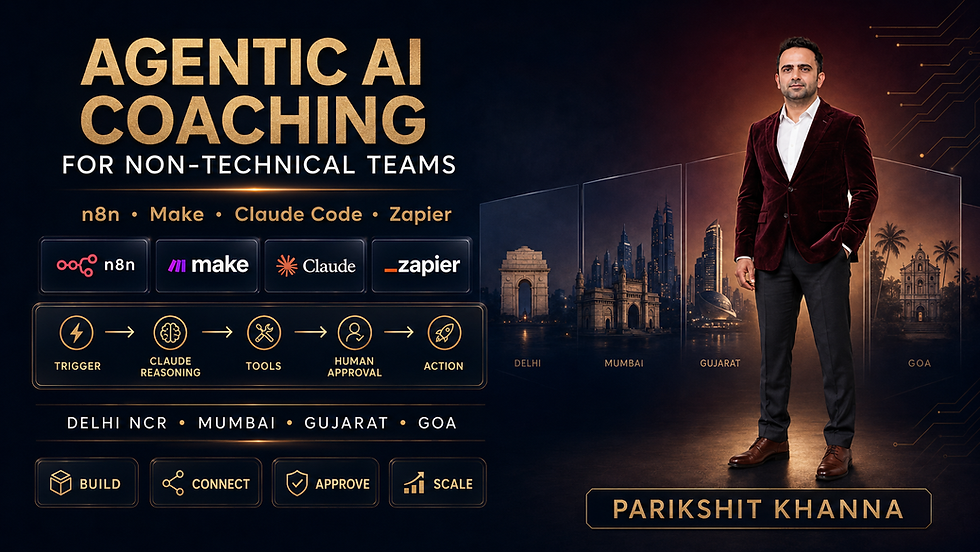
Agentic AI can do more than generate text. With clear instructions, approved tools and sensible controls, an AI agent can read an enquiry, classify it, look up permitted information, prepare a response, ask a person for approval and then update a business application.
For non-technical teams, the best training is not a long software demonstration. It is a guided programme that converts one real process into a safe, measurable workflow.
This article compares n8n, Make.com, Zapier and Claude Code, explains how Claude connects to each platform, and presents a practical six-month adoption plan for organisations in Delhi NCR, Mumbai, Gujarat, Goa and other Indian locations.
Featured Trainer: Parikshit Khanna (online or on-site corporate programmes, subject to scheduling and written scope).
Quick Answer: Which Agentic AI Tool Should a Non-Technical Team Learn First?
Team Requirement | Recommended Starting Point | Why |
First no-code automation | Zapier | Straightforward trigger-and-action model + large app directory |
Visual multi-step workflows | Visual scenario canvas with routers, filters and agent tools | |
Flexible automation with technical support | n8n | Visual workflows, self-hosting options, code nodes |
Coding, repository work & developer operations | Claude Code | Reads/edits project files, runs approved commands via MCP |
Claude-powered business workflows | Make.com, n8n or Zapier | Each can connect Claude to approved business applications |
Regulated or high-risk process | Start with human approval | A person must remain accountable for money, employment, legal, medical and safety decisions |
Recommended learning path for non-technical employees: Prompt fundamentals → One visual automation → Structured outputs → Error handling → Human approval → Monitoring → Agentic decision-making.
Agentic AI Tools Comparison (Features, Pricing & Limitations)
Prices checked around 15 August 2026. Always confirm current pricing before procurement.
Tool | Useful Features | Best Business Uses | Beginner Fit | Starting Price (approx.) | Important Limitation |
n8n | Visual nodes, webhooks, AI Agent nodes, code steps, self-hosting | Custom operations, data routing, internal assistants, ticket triage | Medium | Community free (self-hosted); Cloud Starter €20/mo annually | Self-hosting transfers security responsibility to the organisation |
Visual Scenario Builder, routers, filters, 3,000+ apps, Make AI Agents | Marketing ops, support, research, CRM updates | High | Free: 1,000 credits; Core ~$9–12/mo | Credits are consumed by module actions | |
Zapier | Two-step & multi-step Zaps, webhooks, AI fields, broad connectivity | Fast SaaS automation, forms-to-CRM, simple approval flows | High | Free: 100 tasks; Professional from ~$20/mo | Task consumption grows with successful actions |
Claude Code | Agentic coding, project-file understanding, Git, MCP connections | Internal tools, API integrations, scripts, data transformations | Low–Medium | Included in paid Claude plans (Pro ~$17–20/mo) | Requires version control, least privilege and human review |
Claude API | Long-form reasoning, classification, structured output, tool calling | Reasoning layer inside n8n / Make / Zapier | Medium | Usage-based token pricing | Separate API cost + privacy review required |
How Claude Connects with Automation Platforms
Connection | Simple Workflow Example | What Training Should Cover |
Claude + n8n | Form → n8n AI Agent → CRM lookup → Human approval → Email/CRM update | Credentials, model choice, tool boundaries, structured output, retries, logs |
Claude + Make.com | Support ticket → Make AI Agent → Knowledge lookup → Suggested response → Manager approval | Custom provider connection, routers, credit consumption, error handlers |
Claude + Zapier | New lead/email → Claude action → Classification/draft → Paths/approval → Business app | API key, field mapping, prompt templates, task usage, audit trail |
Claude Code + MCP | Approved request → Claude Code → Trusted MCP server → Proposed change → Review/test → Merge | Installation, permissions, secret handling, Git branch, test plan, rollback |
Practical Use Cases by Department
Department | Safe First Use Case | Agentic Extension (After Testing) | Human Checkpoint |
Sales | Summarise form submissions and draft CRM notes | Research and prioritise leads using approved criteria | Salesperson approves outreach |
Marketing | Convert approved brief into channel drafts | Coordinate content variants and campaign tasks | Brand/legal owner approves publication |
Customer Service | Classify tickets and suggest replies | Retrieve approved knowledge and route cases | Agent approves sensitive responses |
HR | Draft job descriptions and onboarding checklists | Coordinate approved onboarding tasks | HR decides hiring and employee actions |
Finance | Extract fields from invoices and flag mismatches | Prepare reconciliation queues | Finance owner approves payments |
Operations | Produce a daily exception report | Create and assign tasks across systems | Process owner approves exceptions |
Leadership | Summarise approved dashboards and meeting notes | Generate a daily decision brief | Executive validates numbers and context |
IT | Draft scripts, tests and documentation | Claude Code proposes repository changes | Developer reviews diff, tests and merge |
Six-Month Agentic AI Adoption Plan
Month | Objective | Key Actions | Evidence of Progress |
1: Discover | Select valuable, low-risk workflows | Interview teams, map data, record baseline, exclude high-risk decisions | Ranked use-case register + baseline metrics |
2: Build Foundations | Train champions and launch simple automations | Prompt lab, Make/Zapier basics, n8n orientation, DPDP briefing | Three tested workflows + skills check |
3: Add Agents Carefully | Introduce reasoning and tool use | Connect Claude, require structured output, add human approvals | Test set, approval log, accuracy rate |
4: Integrate | Connect approved systems and knowledge | CRM/helpdesk integration, role-based access, secret management | Access register + architecture diagram |
5: Govern & Optimise | Make reliability and cost visible | Red-team prompts, review logs, monitor costs, establish incident response | Quality, cost, latency and incident dashboard |
6: Scale | Expand only proven workflows | Promote champions, standardise templates, retire weak automations | 10–20 governed workflows + ROI review |
Trainer Profile: Parikshit Khanna
Profile Item | Details |
Reach | More than 3 Lakh professionals trained |
Experience | 15+ years in AI, digital marketing and corporate training |
Delivery | Online, classroom and on-site corporate sessions |
Training Areas | Generative AI, ChatGPT, Claude, Prompt Engineering, workflow automation, n8n, agentic AI |
Coverage | Delhi NCR, Mumbai, Gujarat, Goa and other Indian locations |
Indicative Training Fees (Historical / Trainer-Supplied)
Format | Duration | Earlier Indicative Fee |
Online workshop | 2 hours | ₹5,000 |
Online workshop | 4 hours | ₹8,000 |
Online workshop | 8 hours | ₹15,000 |
On-site workshop | 2 hours | ₹8,000 |
On-site workshop | 4 hours | ₹12,000 |
On-site workshop | 8 hours | ₹20,000 |
One-month adoption sprint | Custom | Written proposal required |
Three- or six-month programme | Custom | Written proposal required |
Software subscriptions, API usage, taxes and travel are usually billed separately.
Frequently Asked Questions
Question | Answer |
Is agentic AI suitable for non-technical employees? | Yes, when training starts with a visual workflow and a low-risk process. |
Which is easiest for beginners? | Zapier is often the simplest first step. Make.com is highly visual. n8n offers more flexibility. |
Can Claude connect to n8n, Make and Zapier? | Yes — each platform supports Anthropic/Claude connections (API key required). |
Is Claude Code no-code? | No. It is an agentic coding tool and requires controlled setup with Git and permissions. |
Can an AI agent send emails or update a CRM automatically? | Yes, but start in draft/sandbox mode and require human approval for external or irreversible actions. |
Does training include software licences? | Not unless the written proposal explicitly says so. |
Book an Agentic AI Training Consultation
Parikshit Khanna Enterprise AI Trainer | Founder – Digital Training Jet
Email: pkhanna123@gmail.com Phone / WhatsApp: +91 99972 13177 | +91 80762 50669
When enquiring, please share: city, industry, department, participant count, current applications, preferred platform, security restrictions, and the one process you want to improve.

