Half-Day AI Productivity Training in Delhi NCR 2026: 4-Hour Corporate AI Workshop for Noida, Gurugram & Greater Noida Teams

Updated: Oct 20
Quick answer
Updated 20 October 2026. For AI training in Noida, Parikshit Khanna runs hands-on ChatGPT, Claude, Microsoft 365 Copilot, Gemini and Grok sessions at your office or live online, with a written proposal before booking. See the full programme page: Corporate AI training in Noida. Trainer-reported reach: 3,50,000+ professionals since 2020.
Half-Day AI Productivity Training in Delhi NCR 2026: 4-Hour Corporate AI Workshop for Noida, Gurugram & Greater Noida Teams |
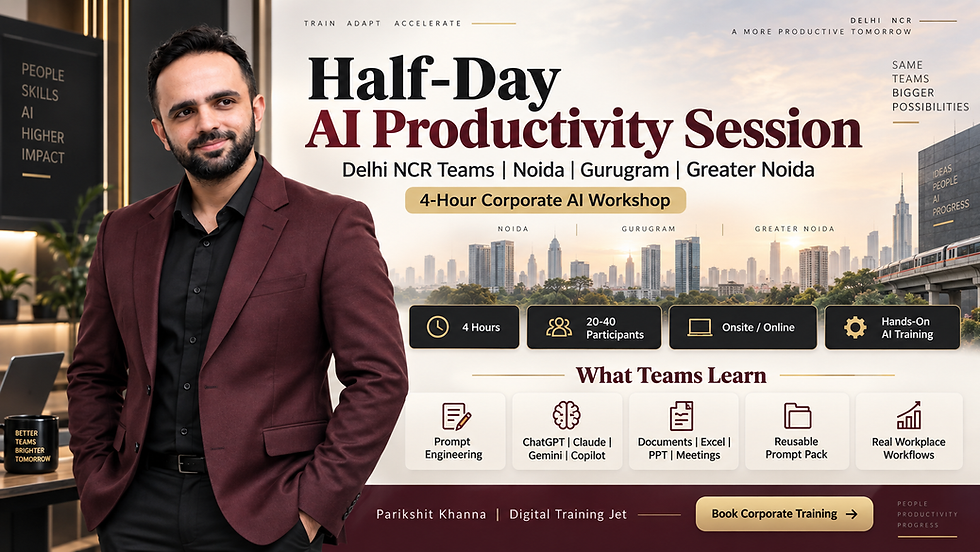
A practical 4-hour corporate AI productivity session for 20 to 40 professionals, led by Parikshit Khanna, Founder of Digital Training Jet. Designed for organisations that want employees to use ChatGPT, Claude, Gemini, Microsoft Copilot and Prompt Engineering for real workplace tasks, not generic AI demonstrations. |
Artificial Intelligence adoption becomes valuable only when employees can connect AI with the work they already perform. This Half-Day AI Productivity Session in Delhi NCR is designed as a compact, hands-on corporate programme that helps teams move from occasional AI experimentation to structured workplace use. |
The workshop can be delivered onsite across Delhi, Noida, Greater Noida, Greater Noida West, Gurugram, Manesar, Ghaziabad and Faridabad, or online for distributed teams. |
In four focused hours, participants learn how to write stronger prompts, select the right AI tool, research efficiently, work with documents and spreadsheets, create presentations, improve professional communication and identify repeatable workflows that can save time after the session. |
Half-Day AI Productivity Session: Quick Overview | Details |
Programme | Half-Day Corporate AI Productivity Workshop |
Duration | 4 Hours |
Recommended Group Size | 20 to 40 participants |
Lead Trainer | Parikshit Khanna |
Organisation | Digital Training Jet |
Format | Hands-on corporate workshop |
Delivery | Onsite, live online or hybrid |
Primary Locations | Delhi, Noida, Greater Noida, Gurugram and Delhi NCR |
Audience | Corporate professionals, managers, department heads and leadership teams |
Core Platforms | ChatGPT, Claude, Gemini and Microsoft Copilot |
Additional Areas | Prompt Engineering, research, documents, presentations, spreadsheets, AI agents and workflow automation |
Technical Requirement | No coding required for the standard business-user programme |
Customisation | Industry, department and participant-role specific |
Primary Outcome | Employees leave with usable prompts, workflows, templates and a practical AI adoption plan |
Who Is This Half-Day AI Training Designed For? | Typical AI Productivity Need |
CEOs / CXOs | Faster research, executive summaries, decision preparation and AI governance |
Managers | Reports, meetings, communication and team productivity |
HR / L&D | Recruitment, onboarding, policy summaries and learning content |
Finance / FP&A | Excel support, variance analysis, MIS and management commentary |
Sales | Customer research, proposals, follow-ups and meeting preparation |
Marketing | Research, campaign planning, content and competitor analysis |
Operations | SOPs, process documentation, reports and workflow improvement |
Procurement | Vendor comparisons, RFQs and supplier communication |
Administration | Emails, meeting notes, documents and coordination |
Project Teams | Status reporting, risks, action items and presentation preparation |
Entrepreneurs / SMEs | Research, communication, marketing and productivity automation |
Why a 4-Hour AI Productivity Workshop Works |
Many organisations do not initially require a multi-day AI programme. They need a focused starting point that employees can understand and apply immediately. |
Four hours provides enough time to cover AI fundamentals, Prompt Engineering, practical business tools, role-specific use cases, responsible AI and implementation, while remaining short enough to fit into a normal corporate working day. |
The objective is not to teach every AI feature available. It is to help employees master the small number of AI workflows that can make the biggest immediate difference to their work. |
4-Hour Workshop Agenda | Coverage | Participant Outcome |
0:00–0:25 | AI & Generative AI for the Workplace | Understand where AI genuinely creates business value |
0:25–0:55 | Prompt Engineering | Learn a structured method for giving AI better instructions |
0:55–1:30 | ChatGPT, Claude, Gemini & Copilot | Understand which tool fits which task |
1:30–2:05 | Research, Documents & Communication | Build practical workflows for everyday knowledge work |
2:05–2:35 | Excel, Data & Reporting | Use AI to analyse, explain and communicate business information |
2:35–3:05 | Presentations & Meetings | Create stronger decks, meeting summaries and action plans |
3:05–3:30 | Department-Specific AI Lab | Apply AI to participants' actual functional roles |
3:30–3:50 | Responsible AI & Data Security | Understand privacy, hallucinations and human review |
3:50–4:00 | 30-Day Action Plan | Select workflows participants can apply after training |
Parikshit Khanna's 5 Golden Rules of Prompting | Question to Answer |
1. Role | Who should the AI act as? |
2. Task | What exactly should it complete? |
3. Context | Which business information and situation matter? |
4. Constraints | What should the AI not assume, disclose, invent or change? |
5. Output Format | What should the final result look like? |
Advanced Prompt Framework for Corporate Teams |
Role + Task + Approved Context + Constraints + Output Format + Evidence + Uncertainty + Human Review |
This extended method is especially valuable for Finance, HR, Procurement, Leadership, Healthcare, Legal and other workflows where AI-generated output requires additional verification. |
Example Corporate Prompt Used in Training |
Role: Act as a senior business analyst. |
Task: Analyse the attached monthly performance report. |
Context: The output will be used in Monday's leadership meeting. |
Constraints: Do not invent reasons for performance changes. Use only the information supplied. |
Output Format: Create a table containing finding, evidence, business implication, unresolved question and recommended next action. |
Evidence: Ground every material observation in the supplied report. |
Uncertainty: Clearly identify missing information. |
Human Review: Finish with items requiring management confirmation. |
AI Tools Covered | What Teams Learn to Use Them For |
ChatGPT | Research, analysis, writing, files, reports and general workplace productivity |
Claude | Long documents, research, structured analysis and knowledge-intensive workflows |
Gemini | Multimodal work, research and Google-oriented productivity |
Microsoft Copilot | Word, Excel, PowerPoint, Outlook and Teams workflows |
Gemini Notebook / NotebookLM | Source-grounded research and knowledge management |
Perplexity | Source-assisted research |
Canva AI | Business graphics and presentation assets |
Gamma | Rapid presentation development |
n8n | Introduction to AI-powered workflow automation |
AI Agents | Understanding repeatable multi-step business workflows |
The Workshop Does Not Teach “Tool Tourism” |
Participants do not need demonstrations of 50 unrelated AI tools. |
They need to understand which approved AI platform solves which recurring problem, how to prompt it effectively and how to verify the output before using it professionally. |
AI for Word & Documents | Practical Exercise |
Reports | Turn raw information into structured business reports |
SOPs | Convert process notes into clear operating procedures |
Policies | Summarise approved policy material |
Proposals | Develop professional first drafts |
Executive Summaries | Convert long reports into leadership briefs |
Rewriting | Improve clarity, tone and structure |
Comparison | Compare versions and identify important changes |
AI for Excel & Business Data | Practical Exercise |
Formula Assistance | Generate and explain formulas |
Data Questions | Ask natural-language questions about data |
Variance Analysis | Identify material differences |
Trends | Detect important patterns |
Outliers | Surface unusual values |
Management Commentary | Draft first-pass analysis |
Reporting | Convert data into management-friendly summaries |
AI for PowerPoint & Presentations | Practical Exercise |
Report-to-Deck | Convert approved material into slides |
Executive Decks | Build leadership presentations |
Sales Presentations | Structure pitches and proposals |
Training Decks | Convert SOPs into learning material |
Speaker Notes | Prepare first drafts for presenters |
Storytelling | Turn information into a clear narrative |
AI for Outlook, Email & Professional Communication | Practical Exercise |
Email Threads | Summarise long conversations |
Replies | Draft clear professional responses |
Tone | Improve executive communication |
Follow-Up | Extract pending actions |
Meeting Preparation | Identify issues before meetings |
Customer Communication | Draft responses using approved information |
AI for Meetings & Team Productivity | Practical Exercise |
Meeting Summary | Capture key discussions |
Decisions | Separate decisions from suggestions |
Action Items | Identify owners and next steps |
Follow-Up | Draft post-meeting communication |
Project Tracking | Convert discussion into structured updates |
Management Recap | Prepare leadership-ready meeting summaries |
Department-Specific Use Cases | Examples Practised During Training |
Leadership | Strategy briefs, board notes and decision preparation |
HR | JDs, onboarding, policies and employee communication |
Finance | Variance analysis, reporting and Excel workflows |
Sales | Prospect research, proposals and follow-up |
Marketing | Research, campaigns, SEO and content planning |
Operations | SOPs, process mapping and incident summaries |
Procurement | RFQs, vendor comparisons and negotiation preparation |
Project Management | Status updates, risk reports and meeting-to-action workflows |
Cross-App AI Productivity Workflow |
Meeting → AI Summary → Action Items → Data Analysis → Business Report → Presentation → Follow-Up Email |
This is more useful than teaching every application as an isolated feature. |
What Participants Take Home | Why It Matters |
Corporate Prompt Framework | Makes future prompting more consistent |
Role-Specific Prompt Pack | Gives employees immediately reusable instructions |
AI Tool Selection Guide | Helps teams choose the right platform |
Document Workflow Templates | Improves reports, proposals and SOPs |
Excel / Data Prompt Examples | Makes analysis easier to repeat |
Meeting & Email Prompt Templates | Reduces repetitive communication work |
Responsible AI Checklist | Helps employees avoid unsafe usage |
Verification Framework | Encourages human review before business use |
Department Use-Case Canvas | Identifies tasks suitable for AI |
30-Day AI Action Plan | Helps learning continue after the workshop |
What the Organisation Takes Home |
A clearer view of which teams can benefit most from AI |
A shortlist of immediate productivity use cases |
Reusable prompt structures |
Common responsible-AI language |
Ideas for department-specific pilots |
Initial candidates for deeper automation or Agentic AI |
A foundation for a longer AI adoption programme if required |
Responsible AI Is Built Into the Workshop | What Employees Learn |
Hallucinations | AI can produce confident but incorrect information |
Privacy | Confidential information should only enter approved systems |
Verification | Important facts, numbers and claims require checking |
Permissions | AI does not override organisational access rules |
Human Accountability | Employees remain responsible for final work |
Sensitive Functions | Finance, HR, Legal and Healthcare require additional review |
Automation | High-impact actions should include appropriate approval gates |
About Parikshit Khanna | Professional Profile |
Name | Parikshit Khanna |
Organisation | Digital Training Jet |
Role | Enterprise AI Trainer & Corporate Enablement Specialist |
Public Speaking | TEDx Speaker |
Training Platforms | ChatGPT, Claude, Gemini and Microsoft Copilot |
Advanced Areas | Prompt Engineering, Agentic AI, AI Agents, n8n and automation |
Training Audience | Corporate leadership and cross-functional teams |
Delivery | Delhi NCR, pan-India onsite, online and hybrid |
Professional Approach | Practical, role-specific and implementation-focused |
Selected Recent Enterprise Training Experience |
Microsoft Copilot workplace training |
Claude-focused corporate training |
Generative AI productivity workshops |
AI for Sales and Marketing |
AI for Finance / FP&A |
AI for HR and L&D |
AI for Real Estate |
AI for Manufacturing and Operations |
AI for Healthcare and Pharma |
Leadership and CXO AI programmes |
Who Should Book This 4-Hour Format? |
Organisations starting structured AI adoption |
Teams that have already experimented with ChatGPT but lack consistency |
Companies rolling out Microsoft Copilot or enterprise AI licences |
L&D teams looking for a practical AI foundation |
Leadership teams wanting employees to move beyond basic prompting |
Companies wanting a pilot workshop before a larger programme |
Departments seeking immediate workplace productivity use cases |
When a Half-Day Workshop May Not Be Enough | Consider Instead |
Multiple departments require separate labs | Full-day programme |
Employees need advanced Copilot training | Dedicated Microsoft Copilot workshop |
Teams need AI agents and automation | Agentic AI + n8n programme |
Developers need AI coding workflows | Technical AI programme |
Company needs implementation support | 30-day AI adoption sprint |
Organisation needs governance design | AI governance workshop |
Multiple cities or business units | Enterprise rollout programme |
Half-Day vs Full-Day Corporate AI Training | Half-Day | Full-Day |
Duration | 4 hours | 6–8 hours |
Audience | 20–40 recommended | Custom |
AI Fundamentals | Yes | Yes |
Prompt Engineering | Yes | Deeper |
Major AI Tools | Selected | Broader |
Department Exercises | Focused | Extended |
Automation | Introduction | Deeper |
Agentic AI | Introduction | Practical exploration |
Governance | Core principles | Deeper scenarios |
Implementation | 30-day starter plan | Detailed roadmap |
Best For | Fast productivity uplift | Deeper capability building |
Training Locations Across Delhi NCR | Typical Delivery |
Delhi | Corporate offices, institutions and professional groups |
Noida | Technology, consulting, enterprise and corporate teams |
Greater Noida | Manufacturing, universities, real estate and professional teams |
Greater Noida West | Corporate and institutional programmes |
Gurugram / Gurgaon | MNCs, GCCs, consulting, Finance, Sales and leadership teams |
Manesar | Manufacturing, engineering and industrial teams |
Ghaziabad | Corporate, SME and institutional audiences |
Faridabad | Manufacturing and professional teams |
Popular Corporate Hubs Covered |
Noida Sector 62 |
Noida Expressway |
Greater Noida Knowledge Park |
Greater Noida West |
Cyber City Gurugram |
Udyog Vihar |
Golf Course Road |
Golf Course Extension Road |
Sohna Road |
Manesar |
Aerocity Delhi |
Connaught Place |
Nehru Place |
Jasola |
Okhla |
Indicative Commercial Structure | Approach |
4-Hour Corporate AI Productivity Workshop | Custom quotation |
Recommended Participants | 20–40 |
Onsite Delhi NCR | Quoted according to location, group size and customisation |
Online | Custom quotation |
Industry-Specific Customisation | Available |
Department-Specific Prompt Pack | Can be included |
Post-Session Support | Can be included in commercial scope |
Taxes | Applicable taxes additional where relevant |
Why Pricing Is Customised |
Participant count |
Training location |
Number of departments |
Industry-specific examples |
AI platforms required |
Existing enterprise licences |
Custom prompt library requirements |
Assessment or certification requirements |
Post-training support |
Travel, where applicable |
How to Measure the Impact of a 4-Hour AI Workshop | Metric |
Prompt Quality | Can employees write structured instructions? |
Tool Selection | Can employees choose an appropriate AI tool? |
Task Completion | Can they complete an approved workflow independently? |
Time Saved | Is the task faster after including review time? |
Quality | Is AI-assisted work accepted by the manager? |
Rework | How many corrections are required? |
Reuse | Are employees using the workflow again after training? |
Adoption | How many approved use cases survive after 30 days? |
A Better AI Training ROI Question |
Do not ask only: “How many employees attended?” |
Ask: “Which recurring workplace tasks changed after the workshop, and did the new process save time or improve quality after human review?” |
Frequently Asked Question | Answer |
How long is the Half-Day AI Productivity Session? | Approximately four hours. |
How many participants can attend? | A group of approximately 20 to 40 participants is recommended for interactive delivery, although other group sizes can be discussed. |
Is the workshop suitable for beginners? | Yes. It can begin with AI fundamentals before moving into practical workflows. |
Is coding required? | No. |
Does the workshop cover ChatGPT? | Yes. |
Can Claude be covered? | Yes. |
Can Gemini be included? | Yes. |
Can Microsoft Copilot be included? | Yes, especially for Microsoft 365 organisations. |
Does the training include Prompt Engineering? | Yes. It is a core part of the programme. |
Can the workshop be customised for Finance? | Yes. |
Can it be customised for HR, Sales or Marketing? | Yes. |
Can employees use company files during exercises? | Only approved, non-sensitive material should be used unless the organisation has specifically authorised another secure environment. |
Can the workshop be delivered at our office? | Yes, subject to date, location and commercial confirmation. |
Is online training available? | Yes. |
Can certificates be provided? | Yes, where included in the agreed scope. |
Does four hours make employees AI experts? | No. The purpose is to build a strong practical foundation and identify workflows suitable for continued adoption. |
Book a Half-Day AI Productivity Session in Delhi NCR | Contact Details |
Trainer | Parikshit Khanna |
Organisation | Digital Training Jet |
Programme | Half-Day AI Productivity Session |
Duration | 4 Hours |
Recommended Group | 20–40 participants |
Coverage | ChatGPT, Claude, Gemini, Microsoft Copilot, Prompt Engineering and workplace AI |
Locations | Delhi, Noida, Greater Noida, Gurugram and Delhi NCR |
Official Email | |
Phone / WhatsApp | +91 99972 13177 |
Alternate Phone | +91 80762 50669 |
Website |
What to Share When Requesting a Proposal |
Organisation name |
Industry |
Training location |
Participant count |
Participant departments |
Seniority |
Current AI experience |
Existing AI subscriptions |
Priority productivity problems |
Preferred AI tools |
Preferred date |
Onsite / online requirement |
Desired business outcomes |
Final Takeaway |
A half-day AI workshop should not try to turn employees into AI engineers. |
Its job is to help professionals become better users of AI for the work they already perform. |
In four focused hours, teams can learn how to structure prompts, select the right AI platform, research more effectively, improve documents, analyse information, create presentations, manage communication and identify workflows worth developing further. |
Parikshit Khanna and Digital Training Jet’s Half-Day AI Productivity Session for Delhi NCR Teams is designed as a practical entry point for organisations that want to move from AI curiosity to structured workplace adoption without committing immediately to a multi-day programme. |
Four hours. Real work. Reusable prompts. Clearer workflows. A practical starting point for building an AI-ready team. |
Book AI training in Noida: contact Parikshit Khanna
Send your company name, departments, headcount, office location, approved AI tools, preferred dates and two priority tasks. You will get a written proposal with scope, dates and fees.
Channel | Details |
|---|---|
Business email | |
Personal email | |
Phone | +91 99972 13177 | +91 80762 50669 |
Proposal request | |
Private sessions |